Released
v0.20.0 · Releases
Point. Describe. Improve.
What changed
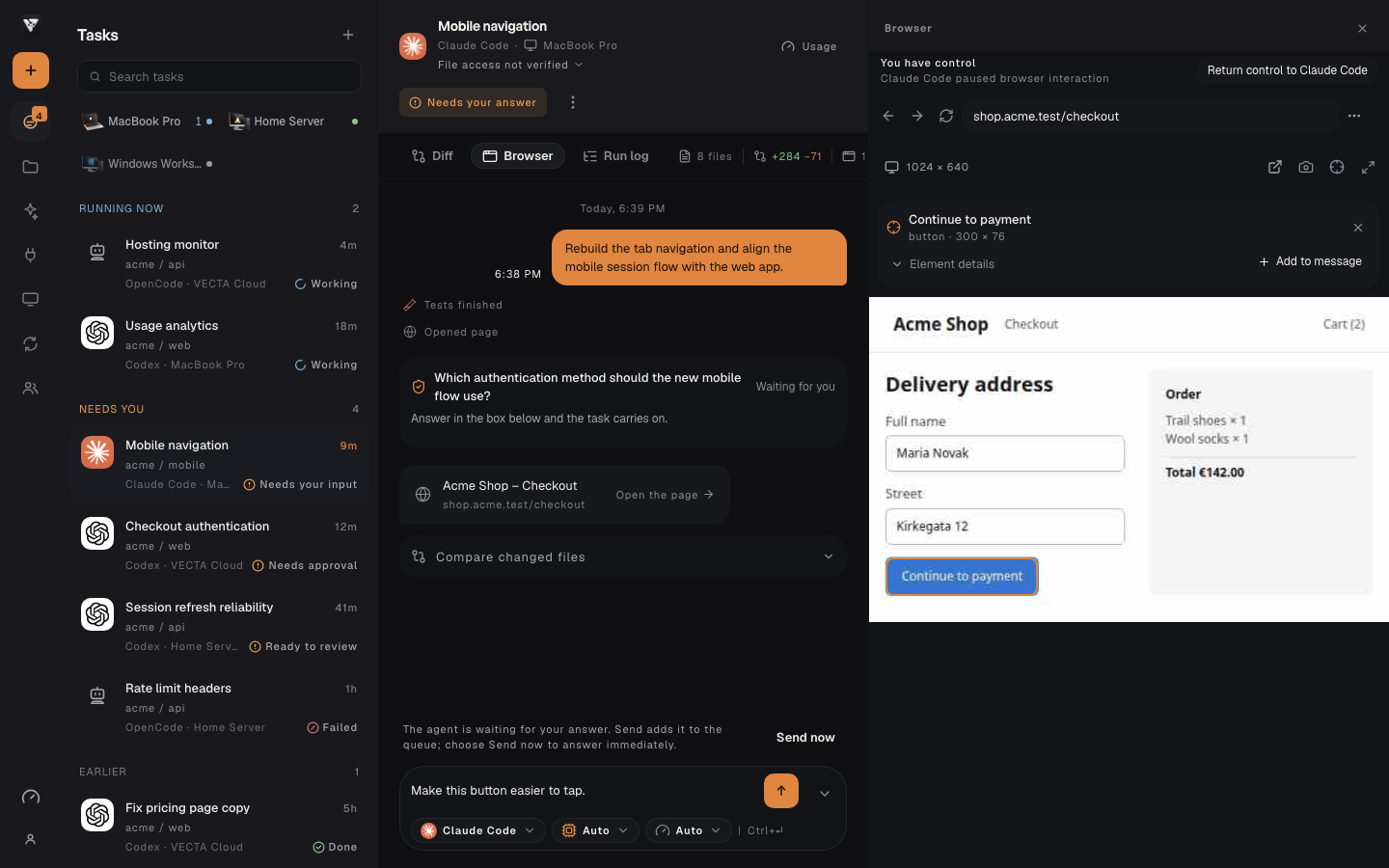
- Attach the exact browser element to your message without clicking the page or losing your draft.
- Resize the browser panel and test real desktop, tablet and phone viewports.
- Choose from ten remote MCP connections, with project setup and individual approval for tool calls.
Show which part needs work
Take control of the task browser, choose Select element and point to the part you want to change. A compact card shows its name, dimensions and expandable DOM details. Add it to your draft, describe the change and send when you are ready.
Selecting does not click the page or send a message. Your existing draft stays in place, and the same element context travels through the normal conversation and message queue to your chosen agent. On a phone, adding the card returns you to the composer.
Check the layout where people use it
Desktop, tablet and phone presets change the actual browser viewport. On a wide screen, drag the panel edge or expand the browser to inspect more of the page while keeping the conversation nearby. Keyboard resizing is available too.
When the page navigates or its size changes, VECTA waits for the new picture before accepting more input. Update the connected computer to see these controls; older runners keep their existing browser features.
Bring the right service into the task
Skills adds Supermemory Docs, Context7, Microsoft Learn, Cloudflare Docs, DeepWiki, GitHub MCP, Supabase MCP, Stripe MCP, Linear MCP and Tavily. Recognizable service marks and compact setup controls make the connections easier to find.
Public documentation connections need no provider key; Context7 also accepts an optional key. GitHub, Supabase, Stripe, Linear and Tavily use your own provider token. Choose the VECTA project during setup; Supabase also requires its project reference. Provider permissions, availability and usage charges still apply.
The agent can discover the available tools. Before each tool call, VECTA shows the request and asks for approval. A standing command permission does not approve later requests to an external service. GitHub, Supabase and Linear start with read-only provider access.
Documentation and personal memory stay distinct
Supermemory Docs helps you build memory into your own application using the official API, CLI and skills documentation. It does not connect your personal memories. The separate Supermemory connection uses provider sign-in and an explicitly selected memory space.
If the provider sign-in browser did not open, the desktop setup now lets you open it again. Authorization still completes with the provider; repository files and conversations are not uploaded automatically.
Useful context, with clear boundaries
Element context includes a bounded description of the selected DOM element. Form values, scripts and event handlers are excluded. Page content remains untrusted reference material, and a DOM selector is not permission to read a local file or run a command.
New connections are checked during setup. A service that cannot connect stays unavailable, and an optional service failure does not prevent ordinary task work. Connecting a service does not include a subscription or prove access to every tool on your account.